Tuesday, July 2, 2013

Some tricky SQL queries Part 2 (Interview Questions)


1.Update Employee salary Department wise in single query
update tblEMP
set salary=
case when dept='HR' then
salary + (salary*10)/100 
when dept='IT' then
salary + (salary*20)/100 
when dept='Admin' then
salary + (salary*5)/100 
when dept='SAP' then
salary + (salary*2)/100 
end

2.Get 3 Max salaries ?

select distinct sal from emp a where 3 >= (select count(distinct sal) from emp b where a.sal <= b.sal) order by a.sal desc;


3.Get 3 Min salaries ?

select distinct sal from emp a where 3 >= (select count(distinct sal) from emp b where a.sal >= b.sal);


4. Count of number of employees in department wise

select count(EMPNO), b.deptno, dname from emp a, dept b where a.deptno(+)=b.deptno group by b.deptno,dname;


5. Delete duplicate rows in a table

delete from emp a where rowid != (select max(rowid) from emp b where a.empno=b.empno);

Sunday, July 29, 2012

Drop all the tables, stored procedures, triggers, constriants and all dependencies from SQL Server 2005

Drop all the tables, stored procedures, triggers, constriants and all dependencies from SQL Server 2005

Code


/* Drop all non-system stored procs */
DECLARE @name VARCHAR(128)
DECLARE @SQL VARCHAR(254)

SELECT @name = (SELECT TOP 1 [name] FROM sysobjects WHERE [type] = 'P' AND category = 0 ORDER BY [name])

WHILE @name is not null
BEGIN
    SELECT @SQL = 'DROP PROCEDURE [dbo].[' + RTRIM(@name) +']'
    EXEC (@SQL)
    PRINT 'Dropped Procedure: ' + @name
    SELECT @name = (SELECT TOP 1 [name] FROM sysobjects WHERE [type] = 'P' AND category = 0 AND [name] > @name ORDER BY [name])
END
GO

/* Drop all views */
DECLARE @name VARCHAR(128)
DECLARE @SQL VARCHAR(254)

SELECT @name = (SELECT TOP 1 [name] FROM sysobjects WHERE [type] = 'V' AND category = 0 ORDER BY [name])

WHILE @name IS NOT NULL
BEGIN
    SELECT @SQL = 'DROP VIEW [dbo].[' + RTRIM(@name) +']'
    EXEC (@SQL)
    PRINT 'Dropped View: ' + @name
    SELECT @name = (SELECT TOP 1 [name] FROM sysobjects WHERE [type] = 'V' AND category = 0 AND [name] > @name ORDER BY [name])
END
GO

/* Drop all functions */
DECLARE @name VARCHAR(128)
DECLARE @SQL VARCHAR(254)

SELECT @name = (SELECT TOP 1 [name] FROM sysobjects WHERE [type] IN (N'FN', N'IF', N'TF', N'FS', N'FT') AND category = 0 ORDER BY [name])

WHILE @name IS NOT NULL
BEGIN
    SELECT @SQL = 'DROP FUNCTION [dbo].[' + RTRIM(@name) +']'
    EXEC (@SQL)
    PRINT 'Dropped Function: ' + @name
    SELECT @name = (SELECT TOP 1 [name] FROM sysobjects WHERE [type] IN (N'FN', N'IF', N'TF', N'FS', N'FT') AND category = 0 AND [name] > @name ORDER BY [name])
END
GO

/* Drop all Foreign Key constraints */
DECLARE @name VARCHAR(128)
DECLARE @constraint VARCHAR(254)
DECLARE @SQL VARCHAR(254)

SELECT @name = (SELECT TOP 1 TABLE_NAME FROM INFORMATION_SCHEMA.TABLE_CONSTRAINTS WHERE constraint_catalog=DB_NAME() AND CONSTRAINT_TYPE = 'FOREIGN KEY' ORDER BY TABLE_NAME)

WHILE @name is not null
BEGIN
    SELECT @constraint = (SELECT TOP 1 CONSTRAINT_NAME FROM INFORMATION_SCHEMA.TABLE_CONSTRAINTS WHERE constraint_catalog=DB_NAME() AND CONSTRAINT_TYPE = 'FOREIGN KEY' AND TABLE_NAME = @name ORDER BY CONSTRAINT_NAME)
    WHILE @constraint IS NOT NULL
    BEGIN
        SELECT @SQL = 'ALTER TABLE [dbo].[' + RTRIM(@name) +'] DROP CONSTRAINT [' + RTRIM(@constraint) +']'
        EXEC (@SQL)
        PRINT 'Dropped FK Constraint: ' + @constraint + ' on ' + @name
        SELECT @constraint = (SELECT TOP 1 CONSTRAINT_NAME FROM INFORMATION_SCHEMA.TABLE_CONSTRAINTS WHERE constraint_catalog=DB_NAME() AND CONSTRAINT_TYPE = 'FOREIGN KEY' AND CONSTRAINT_NAME <> @constraint AND TABLE_NAME = @name ORDER BY CONSTRAINT_NAME)
    END
SELECT @name = (SELECT TOP 1 TABLE_NAME FROM INFORMATION_SCHEMA.TABLE_CONSTRAINTS WHERE constraint_catalog=DB_NAME() AND CONSTRAINT_TYPE = 'FOREIGN KEY' ORDER BY TABLE_NAME)
END
GO

/* Drop all Primary Key constraints */
DECLARE @name VARCHAR(128)
DECLARE @constraint VARCHAR(254)
DECLARE @SQL VARCHAR(254)

SELECT @name = (SELECT TOP 1 TABLE_NAME FROM INFORMATION_SCHEMA.TABLE_CONSTRAINTS WHERE constraint_catalog=DB_NAME() AND CONSTRAINT_TYPE = 'PRIMARY KEY' ORDER BY TABLE_NAME)

WHILE @name IS NOT NULL
BEGIN
    SELECT @constraint = (SELECT TOP 1 CONSTRAINT_NAME FROM INFORMATION_SCHEMA.TABLE_CONSTRAINTS WHERE constraint_catalog=DB_NAME() AND CONSTRAINT_TYPE = 'PRIMARY KEY' AND TABLE_NAME = @name ORDER BY CONSTRAINT_NAME)
    WHILE @constraint is not null
    BEGIN
        SELECT @SQL = 'ALTER TABLE [dbo].[' + RTRIM(@name) +'] DROP CONSTRAINT [' + RTRIM(@constraint)+']'
        EXEC (@SQL)
        PRINT 'Dropped PK Constraint: ' + @constraint + ' on ' + @name
        SELECT @constraint = (SELECT TOP 1 CONSTRAINT_NAME FROM INFORMATION_SCHEMA.TABLE_CONSTRAINTS WHERE constraint_catalog=DB_NAME() AND CONSTRAINT_TYPE = 'PRIMARY KEY' AND CONSTRAINT_NAME <> @constraint AND TABLE_NAME = @name ORDER BY CONSTRAINT_NAME)
    END
SELECT @name = (SELECT TOP 1 TABLE_NAME FROM INFORMATION_SCHEMA.TABLE_CONSTRAINTS WHERE constraint_catalog=DB_NAME() AND CONSTRAINT_TYPE = 'PRIMARY KEY' ORDER BY TABLE_NAME)
END
GO

/* Drop all tables */
DECLARE @name VARCHAR(128)
DECLARE @SQL VARCHAR(254)

SELECT @name = (SELECT TOP 1 [name] FROM sysobjects WHERE [type] = 'U' AND category = 0 ORDER BY [name])

WHILE @name IS NOT NULL
BEGIN
    SELECT @SQL = 'DROP TABLE [dbo].[' + RTRIM(@name) +']'
    EXEC (@SQL)
    PRINT 'Dropped Table: ' + @name
    SELECT @name = (SELECT TOP 1 [name] FROM sysobjects WHERE [type] = 'U' AND category = 0 AND [name] > @name ORDER BY [name])
END
GO

Thursday, April 12, 2012

Sorting asp.net Gridview using Jquery

Tablesorter is a Jquery pulgin easy to use. Now you can sort your data without postbacking the page.It gives the client side sorting functionality.
Click to check more on Tablesorter

Code

Default.aspx
<%@ Page Title="Home Page" Language="C#" MasterPageFile="~/Site.master" AutoEventWireup="true"
    CodeBehind="Default.aspx.cs" Inherits="jqueryTableSort._Default" %>


Sort gridview using Jquery plugin Table Sorter

Default.aspx.cs
using System;
using System.Collections.Generic;
using System.Linq;
using System.Web;
using System.Web.UI;
using System.Web.UI.WebControls;

namespace jqueryTableSort
{
    public partial class _Default : System.Web.UI.Page
    {
        protected void Page_Load(object sender, EventArgs e)
        {
            if (!IsPostBack) 
            {
                BindGrid();
                
            }

        }
        #region BIND GRID
        private void BindGrid() 
        {
            CountryDataData objData = new CountryDataData();
            GridView1.DataSource = objData.GetCountryDataList();
            GridView1.DataBind();
            GridView1.UseAccessibleHeader = true;
            GridView1.HeaderRow.TableSection = TableRowSection.TableHeader; 

        }
        #endregion
    }
}
CountryData.cs
using System;
using System.Collections.Generic;
using System.Linq;
using System.Web;

namespace jqueryTableSort
{
    public class CountryDataData
    {
        public int Id { get; set; }
        public string CountryName { get; set; }
        public List GetCountryDataList()
        {
            return new List
            {
                new CountryDataData{Id=1,CountryName="India"},
                new CountryDataData{Id=2,CountryName="Australia"},
                new CountryDataData{Id=3,CountryName="UK"},
                new CountryDataData{Id=4,CountryName="UAE"},
                new CountryDataData{Id=5,CountryName="Bangladesh"},
                new CountryDataData{Id=6,CountryName="Austria"},
                new CountryDataData{Id=7,CountryName="Japan"},
                new CountryDataData{Id=8,CountryName="China"},
                new CountryDataData{Id=9,CountryName="Dubai"},
                new CountryDataData{Id=10,CountryName="South Africa"},
                new CountryDataData{Id=11,CountryName="Mexcico"},
                new CountryDataData{Id=12,CountryName="Merryland"},
                new CountryDataData{Id=13,CountryName="USA"},
                new CountryDataData{Id=14,CountryName="Peru"},
                new CountryDataData{Id=15,CountryName="Nepal"},
                new CountryDataData{Id=16,CountryName="Pakistan"},
                new CountryDataData{Id=17,CountryName="Srilanka"},
                new CountryDataData{Id=18,CountryName="Vietnam"},
                new CountryDataData{Id=19,CountryName="Westindies"},
                new CountryDataData{Id=20,CountryName="England"},
                new CountryDataData{Id=21,CountryName="Afganistan"},
                new CountryDataData{Id=22,CountryName="Russia"},
                new CountryDataData{Id=23,CountryName="Newzeland"},
                new CountryDataData{Id=24,CountryName="Timore"},
                new CountryDataData{Id=25,CountryName="Canada"}

            };

        }

    }
}


Download Code


Monday, April 2, 2012

Creating ZIP and UNZIP files in ASP.NET using DotNetZip library.

DotNetZip is easy to use free class library for ziping and extracing the zip files.
Check this DotNetZip for more information.

Example

using System;
using System.Collections.Generic;
using System.Linq;
using System.Web;
using System.Web.UI;
using System.Web.UI.WebControls;
using Ionic.Zlib;
using Ionic.Zip;
using System.IO;


namespace ZipFilesAspDotnet
{
    public partial class _Default : System.Web.UI.Page
    {
        protected void Page_Load(object sender, EventArgs e)
        {

        }
        #region Download ZIP File
        private void DownloadFile()
        {
            if (FileUpload1.HasFile)
            {
                //file upload folder App_Data
                string _fileName = FileuploadUtility.UploadFile(FileUpload1, Server.MapPath("~/App_Data/"), Session.SessionID);
                string[] _zip_fileName = _fileName.ToString().Split('.');
                Response.Clear();
                Response.ContentType = "application/zip";
                Response.AddHeader("content-disposition", "filename=" + "download_" + _zip_fileName.ToString() + ".zip");

                using (ZipFile zip = new ZipFile())
                {
                    zip.AddEntry(_fileName.ToString(), File.ReadAllBytes(Server.MapPath("~/App_Data/" + _fileName.ToString())));
                    zip.Save(Response.OutputStream);
                }
            }

        }
        #endregion

        #region EXTRACT THE ZIP FILE
        private void ExtractZipFile() 
        {
            string _fileName = FileuploadUtility.UploadFile(FileUpload1, Server.MapPath("~/App_Data/"), Session.SessionID);

            using (ZipFile zip1 = ZipFile.Read(Server.MapPath("~/App_Data/" + _fileName.ToString())))
            {
                
                foreach (ZipEntry e in zip1)
                {
                    //destination folder zipfiles
                    e.Extract(Server.MapPath("~/ZipFiles/"), ExtractExistingFileAction.OverwriteSilently);
                }
            }

        }
        #endregion

        protected void Button1_Click(object sender, EventArgs e)
        {
            DownloadFile();

        }

        protected void Button2_Click(object sender, EventArgs e)
        {
            ExtractZipFile();
        }
    }
}


Download Sample

Sunday, February 5, 2012

Change DB owner in SQL Server Database

Change db owner in sql server 2005 database.

Example

DECLARE @old sysname, @sql varchar(1000)

SELECT

 @old = 'oldOwner_CHANGE_THIS'

 , @sql = '

 IF EXISTS (SELECT NULL FROM INFORMATION_SCHEMA.TABLES

 WHERE

     QUOTENAME(TABLE_SCHEMA)+''.''+QUOTENAME(TABLE_NAME) = ''?''

     AND TABLE_SCHEMA = ''' + @old + '''

 )

 ALTER SCHEMA dbo TRANSFER ?'

EXECUTE sp_MSforeachtable @sql

Thursday, October 13, 2011

Difference between ref and out parameters in c#

The difference between ref and out parameters is at the language level. In case of ref you must have to assign it as in "Example by ref" string val is assigned.
In case of out you don't need to assign an out parameter before passing it to a method. But the out parameter in that method must assign the parameter before returning.

Example

public partial class _Default : System.Web.UI.Page
{
    protected void Page_Load(object sender, EventArgs e)
    {
        
        Response.Write("Example by ref");
        string val = "hello";
        ExampleByRef(ref  val);
        Response.Write(val);
        Response.Write("Example by out
"); string vals; ExampleByOut(out vals); } public static void ExampleByRef(ref string val) { if (val == "hello") { System.Web.HttpContext.Current.Response.Write("Example by ref case"); } else { System.Web.HttpContext.Current.Response.Write("Example by ref else response"); } val = "hi"; } public static void ExampleByOut(out string vals) { vals = "Example by Out case
"; System.Web.HttpContext.Current.Response.Write(vals); } }


Output
Example by ref
Example by ref case
hi
Example by out
Example by Out case

Wednesday, September 14, 2011

Track User status if user closes the browser window.

This is a sample application of "User Status" tracking in asp.net. When the user is logged in. This will show the user status as online user. If the user click on logout then it automatically logout user and update the user status as off line. But what if the user closes the browser then also you can track the status.
Here in this example I have used SQL server as database. I have created a table [tbluserlogins] in database with a "userstatus" column as bit datatype. Every time I update the "userstatus" when user logged in and logged out.

Sample Table Structure
CREATE TABLE [dbo].[tblUserLogins](
 [sno] [int] IDENTITY(1,1) NOT NULL,
 [username] [nvarchar](50) COLLATE SQL_Latin1_General_CP1_CI_AS NOT NULL,
 [password] [nvarchar](20) COLLATE SQL_Latin1_General_CP1_CI_AS NOT NULL,
 [userStatus] [bit] NOT NULL,
 [lastLogin] [datetime] NOT NULL CONSTRAINT [DF_tblUserLogins_lastLogin]  DEFAULT (getdate()),
 CONSTRAINT [PK_tblUserLogins] PRIMARY KEY CLUSTERED 
(
 [username] ASC
)WITH (PAD_INDEX  = OFF, IGNORE_DUP_KEY = OFF) ON [PRIMARY]
) ON [PRIMARY]
1. We have to maintain the session state like this
2. In global.asax there we can update the status.
void Application_End(object sender, EventArgs e)
    {
        //  Code that runs on application shutdown
        //Update the user status if the application is closed

        try
        {
            SqlHelper.ExecuteNonQuery(SqlHelper.mainConnectionString, System.Data.CommandType.Text, "update tblUserLogins set userStatus='false' where sno=" + Session["userid"].ToString(), null);
        }
        catch (Exception ex)
        {

            throw ex;
        }


    }


void Session_End(object sender, EventArgs e)
    {
        // Code that runs when a session ends. 
        // Note: The Session_End event is raised only when the sessionstate mode
        // is set to InProc in the Web.config file. If session mode is set to StateServer 
        // or SQLServer, the event is not raised.
        //If the user close the browser window or session is end. It will automatically update the staus
        try
        {
            SqlHelper.ExecuteNonQuery(SqlHelper.mainConnectionString, System.Data.CommandType.Text, "update tblUserLogins set userStatus='false' where sno=" + Session["userid"].ToString(), null);
        }
        catch (Exception ex)
        {

            throw ex;
        }

    }


Download the sample code


Monday, June 13, 2011

Client Callbacks in ASP.NET

Some time a situation comes wherein you want to process some server side processing without refreshing the whole page. This can be achived by using Microsoft ajax controls like "UpdatePanel" but some time you want to implement a functionality on your own in that case you can use your own client Callbacks.
For this first we will implement the System.Web.UI.ICallbackEventHandler. The ICallbackEventHandler has two methods.
1. GetCallbackResult : This method will return the reslut of server side processing.

2. RaiseCallbackEvent : This method will be called by client and you can use it to get the parameter values from client.

In this example I have used a Textbox and getting the value of that text box value in a lable while typing in textbox.


Code


Welcome to ASP.NET!


using System;
using System.Collections.Generic;
using System.Linq;
using System.Web;
using System.Web.UI;
using System.Web.UI.WebControls;

namespace CallbackExample
{


    public partial class _Default : System.Web.UI.Page, System.Web.UI.ICallbackEventHandler
    {
        string _result = string.Empty;
        protected void Page_Load(object sender, EventArgs e)
        {
            //callback reference of the client-side function which will be called after the completion of server side processing. 
            string callbackRef = Page.ClientScript.GetCallbackEventReference(this, "args", "ClientFunction", "");
            // Javascript function that will be called from client to call the server
            string callBackFunctionScript = @"function CallServerFunction(args){" + callbackRef + "}";
            // Now register the script on the page
            Page.ClientScript.RegisterClientScriptBlock(this.GetType(), "CallServerFunction", callBackFunctionScript, true);
        }

        public string GetCallbackResult()
        {
            //throw new NotImplementedException();
            return _result;


        }

        public void RaiseCallbackEvent(string eventArgument)
        {
            _result = eventArgument;
        }

        
    }
}


Download Code

Wednesday, March 16, 2011

Import gmail address using asp.net c#

Import email addresses like in any social networking site.Below example we have used to fetch the gmail address.
For this we require Google Data API and install the same to get the required dlls.
Add these dlls as reference in your project.
1. Google.GData.Client
2. Google.GData.Contacts
3. Google.GData.Extensions
Use .net framework 3.5 or 4.0

Code

Default.aspx.cs
using System;
using System.Collections.Generic;
using System.Linq;
using System.Web;
using System.Web.UI;
using System.Web.UI.WebControls;
using Google.Contacts;
using Google.GData.Client;
using Google.GData.Contacts;
using Google.GData.Extensions;

namespace GmailContacts
{
    public partial class _Default : System.Web.UI.Page
    {
        protected void Page_Load(object sender, EventArgs e)
        {

        }

        #region FETCH EMAIL IDS
        private List FetchEmailIds(string emailid, string password)
        {
            List emaillist = new List();
            try
            {

                RequestSettings Logindetails = new RequestSettings("", emailid, password);
                Logindetails.AutoPaging = true;
                ContactsRequest getRequest = new ContactsRequest(Logindetails);
                Feed listContacts = getRequest.GetContacts();
                foreach (Contact mailAddress in listContacts.Entries)
                {
                    // Response.Write(mailAddress.Title + "
");
                    foreach (EMail emails in mailAddress.Emails)
                    {
                        EmailLists emailaddress = new EmailLists();
                        emailaddress.Title = mailAddress.Title;
                        emailaddress.EmailAddress = emails.Address;
                        //Response.Write(emails.Address + "
");
                        emaillist.Add(emailaddress);
                    }

                }

            }
            catch (Exception)
            {

                Label1.Text = "Sorry your email id  or password does not match.";
            }
            return emaillist;
        }

        protected void Button1_Click(object sender, EventArgs e)
        {
            GridView1.DataSource = FetchEmailIds(txtEmailId.Text, txtPassword.Text);
            GridView1.DataBind();

        }


        #endregion
    }

}

EmailLists.cs
using System;
using System.Collections.Generic;
using System.Linq;
using System.Web;

namespace GmailContacts
{
    public class EmailLists
    {
        public string Title { get; set; }
        public string EmailAddress { get; set; }

    }
}

Download Code

Monday, February 28, 2011

Scheduling the task using WSH script

Sometimes you need to do some automated task perform by the system itself, for a specific time period. You can do this by WSH script.
The below code uses to move the file from one folder to another folder at a specific time period


Code
Dim OriginFolder, DestinationFolder, sFile, oFSO, oShell  
 Set oFSO = CreateObject("Scripting.FileSystemObject") 
 Set oShell = CreateObject("Wscript.Shell") 
 OriginFolder = "d:\folder1" 
 DestinationFolder = "d:\folder2" 
 On Error Resume Next  
  
   Call MoveFiles()  
   
 Sub MoveFiles() 
  
     For Each sFile In oFSO.GetFolder(OriginFolder).Files 
       If Not oFSO.FileExists(DestinationFolder & "\" & oFSO.GetFileName(sFile)) Then 
  oFSO.GetFile(sFile).copy DestinationFolder & "\" & oFSO.GetFileName(sFile),True 
  oFSO.deleteFile(OriginFolder & "\" & oFSO.GetFileName(sFile))
     End If 
     Next 
    
 End Sub 


Steps to install the script in Scheduled Task. Browse your .vbs file in Scheduled Task.


Download Code

Sunday, January 30, 2011

A basic tutorial for WCF: Windows Communication Foundation

What is WCF:  Windows Communication Foundation (WCF) is an SDK for developing and deploying services on Windows. WCF provides a runtime environment for your services, enabling you to expose CLR types as services, and to consume other services as CLR types
WCF is part of .NET 3.0 and requires .NET 2.0, so it can only run on operation systems that support it.

Why do we need this: This is the latest SOA technologies and it combines the features of Web Service,MSMQ,Remoting and COM+.
It provides a common plateform for all .NET communication. Interoperability is the fundamental characteristics of WCF.

ABC's of WCF: The 3 parts of the WCF. Address, Binding and Contract.
Address: Address is the address of the service. like (http://localhost:61685/Service1.svc)
Binding: It has number of binding models. It specifies the protocol to communicate.
Contract: Contract is the method exposed to the client. It gives the Data member serialization this is the main reason that it is faster than Webservice.

It includes Service Contract, Operation Contract and Data Contract

[Service Contract]: This attribute define saying which application interface will be exposed as service.
[Operation Contract]: It defines which method should be exposed to the external client, using this service.
[Data Contract]: Data Contract  defines which type of complex data will be exchanged between the client and server.

The sample code is not a simple "Hello World" application. The sample includes a login system application.
It includes  WCF host and one client. The host authenticate the user against a username and password, checked by WCF host and returns a boolean variable.The client includes a username and password screen, where user can put the username and password to authenticate the client application.


Download Code

Tuesday, December 21, 2010

Inline Table-valued Function in SQL server for optimized result.

Sometime we want to parameterize our view for getting the optimized result, but we cannot pass the parameter to view. In this case we can use inline table valued parameterize function which will return the "Table". We can use this table in joins, sql queries, stored procedures and anywhere like as normal table.
First we will create view and see the result and time taken by view. Then after we will create the function which returns table with a parameter.
Code


View
create view GetAllDatabyCountry
as
select product.productid,product.productname,product.code,product.productPrice
   ,country.countryname,city.cityname
   from product
   left outer join
   country on product.countryid=country.countryid
   left outer join
   city on product.cityId=city.cityId


Function
Create function GetDatabyCountryId(@countryId int)
returns table
as
return (
   select product.productid,product.productname,product.code,product.productPrice
   ,country.countryname,city.cityname
   from product 
   left outer join
   country on product.countryid=country.countryid
   left outer join
   city on product.cityId=city.cityId
   where country.countryid=@countryId
  )


Using Function in Query
create procedure getDataByCountryId
@countryId int
as
begin
select getDataBycountry.* from  dbo.GetDatabyCountryId(@countryId) as getDataBycountry
end

Wednesday, December 15, 2010

Validate checkbox in ASP.NET

You can validate check box or any custom control by using "CustomValidator" and javascript.
 
 Check box in your aspx page


     *
 

Friday, December 3, 2010

Sharing settings specified in appSettings element across multiple projects in .NET.

When you are developing multiple .NET projects and want to share common custom configuration settings specified in the
element, for this you can create a common setting file for your all .NET projects.
In web.config file in you can use file attribute like this.


Code
Web.config file


settings.config file


Wednesday, November 24, 2010

Accessing Master Page User Control (ascx) event and value in content page.

Sometimes a situation comes wherein you want to do some action on any event fired by master page user control in to a content page.
We can do this by the help of "Delegates".

The situation is I have a user control with a dropdown in header.ascx file, which I have integrated in my masterpage.master.
Now I want to access the event of that dropdownbox (SelectedIndexChanged ) in my content page default2.aspx and the value of the drop down box.

How to do that ?


1. Create a Delegate and event Handler in your usercontrol.ascx.

//Creating delegate for dropdownlist
public delegate void OnSelectedIndex(object sender, EventArgs e);

public event OnSelectedIndex ddl_selectedIndexChanged;

2. Create a Delegate and Eventhandler in your Master page, which we will access in Content Page.
//Creating Delegates and Event handler
public delegate void MasterDropDown(object sender, EventArgs e);
public event MasterDropDown Header_DropDown;


3. Now access the same on content page
For this first call the master page like
<%@ MasterType VirtualPath="~/MasterPage.master"%>
//And then in your content page load method
protected void Page_Load(object sender, EventArgs e)
{
Master.Header_DropDown += new MasterPage.MasterDropDown(Master_Header_DropDown);
}

For Accessing the value

1. Define a property in ascx control

//Geting the Drop Down Value
public string DropDownValue
{
get { return DropDownList1.SelectedValue; }
}
2. Access the value in master page

//Geting the User Control value
public string UserControlValue
{
get { return uc_usercontrol1.DropDownValue; }
}
3. Now access the value in Content page in a lable

Label1.Text =Label1.Text+" "+ Master.UserControlValue;


Complete Code

User Control

uc_usercontrol.ascx
<%@ Control Language="C#" AutoEventWireup="true" CodeFile="uc_usercontrol.ascx.cs"
Inherits="uc_Usercontrols" %>
<asp:DropDownList ID="DropDownList1" runat="server" AutoPostBack="True" 
onselectedindexchanged="DropDownList1_SelectedIndexChanged">
<asp:ListItem>1</asp:ListItem>
<asp:ListItem>2</asp:ListItem>
<asp:ListItem>3</asp:ListItem>
<asp:ListItem>4</asp:ListItem>
<asp:ListItem>5</asp:ListItem>
<asp:ListItem>6</asp:ListItem>
<asp:ListItem></asp:ListItem>
</asp:DropDownList>

uc_usercontrol.ascx.cs using System; using System.Collections.Generic; using System.Web; using System.Web.UI; using System.Web.UI.WebControls; using System.Configuration; using System.Collections.Specialized; public partial class uc_Usercontrols : System.Web.UI.UserControl { //Geting the Drop Down Value public string DropDownValue { get { return DropDownList1.SelectedValue; } }

//Creating delegate for dropdownlist public delegate void OnSelectedIndex(object sender, EventArgs e); public event OnSelectedIndex ddl_selectedIndexChanged; protected void Page_Load(object sender, EventArgs e) { }

protected void DropDownList1_SelectedIndexChanged(object sender, EventArgs e) { this.ddl_selectedIndexChanged(sender, e);

} }

Master Page

MasterPage.master
<%@ Master Language="C#" AutoEventWireup="true" CodeFile="MasterPage.master.cs" Inherits="MasterPage" %>

<%@ Register Src="uc_usercontrol.ascx" TagName="uc_usercontrol" TagPrefix="uc1" %> <!DOCTYPE html PUBLIC "-//W3C//DTD XHTML 1.0 Transitional//EN" "http://www.w3.org/TR/xhtml1/DTD/xhtml1-transitional.dtd"> <html xmlns="http://www.w3.org/1999/xhtml"> <head runat="server"> <title></title> <asp:ContentPlaceHolder ID="head" runat="server"> </asp:ContentPlaceHolder> </head> <body> <form id="form1" runat="server"> <div> <uc1:uc_usercontrol ID="uc_usercontrol1" runat="server" /> <asp:ContentPlaceHolder ID="ContentPlaceHolder1" runat="server"> </asp:ContentPlaceHolder> </div> </form> </body> </html> MasterPage.master.cs

using System; using System.Collections.Generic; using System.Web; using System.Web.UI; using System.Web.UI.WebControls;

public partial class MasterPage : System.Web.UI.MasterPage { //Geting the User Control value public string UserControlValue { get { return uc_usercontrol1.DropDownValue; } } //Creating Delegates and Event handler public delegate void MasterDropDown(object sender, EventArgs e); public event MasterDropDown Header_DropDown; protected void Page_Load(object sender, EventArgs e) { this.uc_usercontrol1.ddl_selectedIndexChanged += new uc_Usercontrols.OnSelectedIndex(uc_usercontrol1_ddl_selectedIndexChanged); }

void uc_usercontrol1_ddl_selectedIndexChanged(object sender, EventArgs e) { this.Header_DropDown(sender, e); } }

Default2.aspx <%@ Page Title="" Language="C#" MasterPageFile="~/MasterPage.master" AutoEventWireup="true" CodeFile="Default2.aspx.cs" Inherits="Default2" %> <%@ MasterType VirtualPath="~/MasterPage.master"%> <asp:Content ID="Content1" ContentPlaceHolderID="head" Runat="Server"> </asp:Content> <asp:Content ID="Content2" ContentPlaceHolderID="ContentPlaceHolder1" Runat="Server"> <asp:Label ID="Label1" runat="server" Text="Hi I m visible now" Visible="false"></asp:Label> </asp:Content>

Default2.aspx.cs

using System; using System.Collections.Generic; using System.Web; using System.Web.UI; using System.Web.UI.WebControls;

public partial class Default2 : System.Web.UI.Page {

protected void Page_Load(object sender, EventArgs e) { Master.Header_DropDown += new MasterPage.MasterDropDown(Master_Header_DropDown); }

void Master_Header_DropDown(object sender, EventArgs e) { //Here you can do any activity on change dropdown list Label1.Visible = true; //Accessing the Master page User Control Value in content Page Label1.Text =Label1.Text+" "+ Master.UserControlValue; } }

Download Code

Friday, November 19, 2010

Dynamic SQL Query

Dynamic Sql query means genrating sql query at run time according to need. Some times a situation comes where we have to genrate the dynamic query. Below is the example of a search condition in stored procedure, where I am genrating dynamic query, according to parameter passed in Stored Procedure.
It has demerits too. It will loose the performance boost, what we usually get in stored procedures and most importantly stored procedure can not cache the execution plan for this dynamic query.


Stored Procedure
CREATE proc usp_Getsearchresult  
@countryid int,  
@cityid int,  
@categoryid int,  
@keywords varchar(255)  
as  
--TO HOLD THE QUERY
Declare @setQuery nvarchar(2200)      
--TO HOLD THE WHERE CONDITION VALUES
declare @whereTosearch nvarchar (2000)      
--TO HOLD THE CONDITION
declare @condition int      
set @setQuery='select * from product with (NOLOCK) where '  
 --Condition for country ID  . WHERE COUNTRY ID IS MANDATORY IN CODE
  if (@countryid is not Null)      
 begin      
   set @condition=1      
   set @whereTosearch='countryId='+cast(@countryid as varchar(5))      
 --print '1'  
 end     
 -- Condition for city   
  if (@cityid is not Null and @condition>0)      
 begin      
   set @condition=1      
   set @whereTosearch=@whereTosearch+' and cityId='+ cast(@cityid as varchar(5))  
 --print '2'  
 end     
 --Condition if catetory is selected  
  if (@categoryid is not Null and @condition>0)      
 begin      
   set @condition=1    
   set @setQuery='select product.*,product_category.product_category_type_id from product with (NOLOCK)  
   left  outer join product_category on  product.service_id=product_category.service_id where product_category.product_category_type_id is not null and '  
   set @whereTosearch=@whereTosearch+' and product_category.product_category_type_id='+cast(@categoryid as varchar(5))  
 --print '3'  
 end     
 -- Condition for Keywords   
  if (@keywords is not Null and @condition>0)      
 begin      
   set @condition=1      
   set @whereTosearch=@whereTosearch+' and (productname like ''%'+@keywords+'%'' or product_keyword like ''%'+@keywords+'%'')'  
 --print '4'  
 end   
  
set @setQuery=@setQuery+@whereTosearch      
--print @setQuery  
exec(@setQuery) 

Wednesday, November 3, 2010

Hiding datagrid column at runtime in asp.net

Sometimes you want to hide the column at runtime in datagrid. Below is the code. You can do this on RowCreated event of datagrid.


protected void gvreport_RowCreated(object sender, GridViewRowEventArgs e)
    {
       

        if (username=="Admin")// Your Condition for hiding the column
        {
            if (e.Row.RowType == DataControlRowType.DataRow)
            {
                e.Row.Cells[4].Visible = false;

            }
            if (e.Row.RowType == DataControlRowType.Header)
            {
                e.Row.Cells[4].Visible = false;
            }
        }
    }

Saturday, October 30, 2010

Friday, October 8, 2010

Some tricky SQL queries (Interview Questions)

1.Select nth highest salary and name from emp table
SELECT DISTINCT (a.empsalary),a.Employee_Name FROM empData A WHERE  N =(SELECT COUNT (DISTINCT (b.empsalary)) FROM empData B WHERE a.empsalary<=b.empsalary);
--where N is your number (2nd or 5th)
e.g SELECT DISTINCT (a.empsalary),a.Employee_Name FROM empData A WHERE  5 =(SELECT COUNT (DISTINCT (b.empsalary)) FROM empData B WHERE a.empsalary<=b.empsalary);

2.Select query without using "Like" operator . For eg select employee name start with 'j' and city is 'Noida' in company_name

select * from empdata where CHARINDEX('j',Employee_name)=1 and CHARINDEX('Noida',company_name)>0


3.Select query for grouping 2 coulmns in one column using Case statement

select result=case when p1 is not null then p1 when p2 is not null then p2 end from tbltest


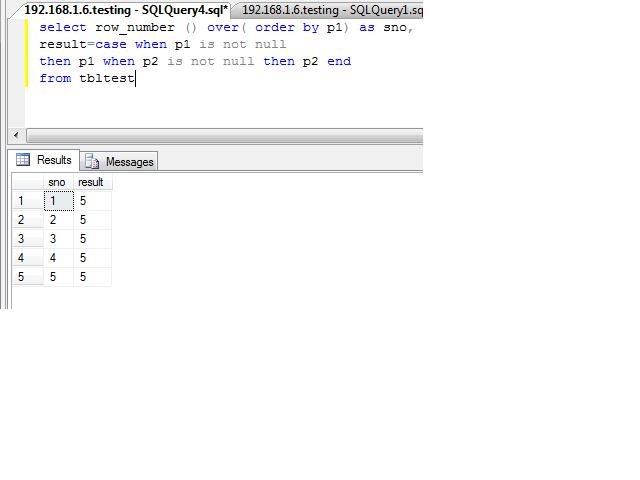
4.Create identity like coulmn in query

select row_number () over( order by p1) as sno, result=case when p1 is not null then p1 when p2 is not null then p2 end from tbltest