Showing posts with label SQL. Show all posts

Tuesday, July 2, 2013

Some tricky SQL queries Part 2 (Interview Questions)


1.Update Employee salary Department wise in single query
update tblEMP
set salary=
case when dept='HR' then
salary + (salary*10)/100 
when dept='IT' then
salary + (salary*20)/100 
when dept='Admin' then
salary + (salary*5)/100 
when dept='SAP' then
salary + (salary*2)/100 
end

2.Get 3 Max salaries ?

select distinct sal from emp a where 3 >= (select count(distinct sal) from emp b where a.sal <= b.sal) order by a.sal desc;


3.Get 3 Min salaries ?

select distinct sal from emp a where 3 >= (select count(distinct sal) from emp b where a.sal >= b.sal);


4. Count of number of employees in department wise

select count(EMPNO), b.deptno, dname from emp a, dept b where a.deptno(+)=b.deptno group by b.deptno,dname;


5. Delete duplicate rows in a table

delete from emp a where rowid != (select max(rowid) from emp b where a.empno=b.empno);

Sunday, July 29, 2012

Drop all the tables, stored procedures, triggers, constriants and all dependencies from SQL Server 2005

Drop all the tables, stored procedures, triggers, constriants and all dependencies from SQL Server 2005

Code


/* Drop all non-system stored procs */
DECLARE @name VARCHAR(128)
DECLARE @SQL VARCHAR(254)

SELECT @name = (SELECT TOP 1 [name] FROM sysobjects WHERE [type] = 'P' AND category = 0 ORDER BY [name])

WHILE @name is not null
BEGIN
    SELECT @SQL = 'DROP PROCEDURE [dbo].[' + RTRIM(@name) +']'
    EXEC (@SQL)
    PRINT 'Dropped Procedure: ' + @name
    SELECT @name = (SELECT TOP 1 [name] FROM sysobjects WHERE [type] = 'P' AND category = 0 AND [name] > @name ORDER BY [name])
END
GO

/* Drop all views */
DECLARE @name VARCHAR(128)
DECLARE @SQL VARCHAR(254)

SELECT @name = (SELECT TOP 1 [name] FROM sysobjects WHERE [type] = 'V' AND category = 0 ORDER BY [name])

WHILE @name IS NOT NULL
BEGIN
    SELECT @SQL = 'DROP VIEW [dbo].[' + RTRIM(@name) +']'
    EXEC (@SQL)
    PRINT 'Dropped View: ' + @name
    SELECT @name = (SELECT TOP 1 [name] FROM sysobjects WHERE [type] = 'V' AND category = 0 AND [name] > @name ORDER BY [name])
END
GO

/* Drop all functions */
DECLARE @name VARCHAR(128)
DECLARE @SQL VARCHAR(254)

SELECT @name = (SELECT TOP 1 [name] FROM sysobjects WHERE [type] IN (N'FN', N'IF', N'TF', N'FS', N'FT') AND category = 0 ORDER BY [name])

WHILE @name IS NOT NULL
BEGIN
    SELECT @SQL = 'DROP FUNCTION [dbo].[' + RTRIM(@name) +']'
    EXEC (@SQL)
    PRINT 'Dropped Function: ' + @name
    SELECT @name = (SELECT TOP 1 [name] FROM sysobjects WHERE [type] IN (N'FN', N'IF', N'TF', N'FS', N'FT') AND category = 0 AND [name] > @name ORDER BY [name])
END
GO

/* Drop all Foreign Key constraints */
DECLARE @name VARCHAR(128)
DECLARE @constraint VARCHAR(254)
DECLARE @SQL VARCHAR(254)

SELECT @name = (SELECT TOP 1 TABLE_NAME FROM INFORMATION_SCHEMA.TABLE_CONSTRAINTS WHERE constraint_catalog=DB_NAME() AND CONSTRAINT_TYPE = 'FOREIGN KEY' ORDER BY TABLE_NAME)

WHILE @name is not null
BEGIN
    SELECT @constraint = (SELECT TOP 1 CONSTRAINT_NAME FROM INFORMATION_SCHEMA.TABLE_CONSTRAINTS WHERE constraint_catalog=DB_NAME() AND CONSTRAINT_TYPE = 'FOREIGN KEY' AND TABLE_NAME = @name ORDER BY CONSTRAINT_NAME)
    WHILE @constraint IS NOT NULL
    BEGIN
        SELECT @SQL = 'ALTER TABLE [dbo].[' + RTRIM(@name) +'] DROP CONSTRAINT [' + RTRIM(@constraint) +']'
        EXEC (@SQL)
        PRINT 'Dropped FK Constraint: ' + @constraint + ' on ' + @name
        SELECT @constraint = (SELECT TOP 1 CONSTRAINT_NAME FROM INFORMATION_SCHEMA.TABLE_CONSTRAINTS WHERE constraint_catalog=DB_NAME() AND CONSTRAINT_TYPE = 'FOREIGN KEY' AND CONSTRAINT_NAME <> @constraint AND TABLE_NAME = @name ORDER BY CONSTRAINT_NAME)
    END
SELECT @name = (SELECT TOP 1 TABLE_NAME FROM INFORMATION_SCHEMA.TABLE_CONSTRAINTS WHERE constraint_catalog=DB_NAME() AND CONSTRAINT_TYPE = 'FOREIGN KEY' ORDER BY TABLE_NAME)
END
GO

/* Drop all Primary Key constraints */
DECLARE @name VARCHAR(128)
DECLARE @constraint VARCHAR(254)
DECLARE @SQL VARCHAR(254)

SELECT @name = (SELECT TOP 1 TABLE_NAME FROM INFORMATION_SCHEMA.TABLE_CONSTRAINTS WHERE constraint_catalog=DB_NAME() AND CONSTRAINT_TYPE = 'PRIMARY KEY' ORDER BY TABLE_NAME)

WHILE @name IS NOT NULL
BEGIN
    SELECT @constraint = (SELECT TOP 1 CONSTRAINT_NAME FROM INFORMATION_SCHEMA.TABLE_CONSTRAINTS WHERE constraint_catalog=DB_NAME() AND CONSTRAINT_TYPE = 'PRIMARY KEY' AND TABLE_NAME = @name ORDER BY CONSTRAINT_NAME)
    WHILE @constraint is not null
    BEGIN
        SELECT @SQL = 'ALTER TABLE [dbo].[' + RTRIM(@name) +'] DROP CONSTRAINT [' + RTRIM(@constraint)+']'
        EXEC (@SQL)
        PRINT 'Dropped PK Constraint: ' + @constraint + ' on ' + @name
        SELECT @constraint = (SELECT TOP 1 CONSTRAINT_NAME FROM INFORMATION_SCHEMA.TABLE_CONSTRAINTS WHERE constraint_catalog=DB_NAME() AND CONSTRAINT_TYPE = 'PRIMARY KEY' AND CONSTRAINT_NAME <> @constraint AND TABLE_NAME = @name ORDER BY CONSTRAINT_NAME)
    END
SELECT @name = (SELECT TOP 1 TABLE_NAME FROM INFORMATION_SCHEMA.TABLE_CONSTRAINTS WHERE constraint_catalog=DB_NAME() AND CONSTRAINT_TYPE = 'PRIMARY KEY' ORDER BY TABLE_NAME)
END
GO

/* Drop all tables */
DECLARE @name VARCHAR(128)
DECLARE @SQL VARCHAR(254)

SELECT @name = (SELECT TOP 1 [name] FROM sysobjects WHERE [type] = 'U' AND category = 0 ORDER BY [name])

WHILE @name IS NOT NULL
BEGIN
    SELECT @SQL = 'DROP TABLE [dbo].[' + RTRIM(@name) +']'
    EXEC (@SQL)
    PRINT 'Dropped Table: ' + @name
    SELECT @name = (SELECT TOP 1 [name] FROM sysobjects WHERE [type] = 'U' AND category = 0 AND [name] > @name ORDER BY [name])
END
GO

Sunday, February 5, 2012

Change DB owner in SQL Server Database

Change db owner in sql server 2005 database.

Example

DECLARE @old sysname, @sql varchar(1000)

SELECT

 @old = 'oldOwner_CHANGE_THIS'

 , @sql = '

 IF EXISTS (SELECT NULL FROM INFORMATION_SCHEMA.TABLES

 WHERE

     QUOTENAME(TABLE_SCHEMA)+''.''+QUOTENAME(TABLE_NAME) = ''?''

     AND TABLE_SCHEMA = ''' + @old + '''

 )

 ALTER SCHEMA dbo TRANSFER ?'

EXECUTE sp_MSforeachtable @sql

Tuesday, December 21, 2010

Inline Table-valued Function in SQL server for optimized result.

Sometime we want to parameterize our view for getting the optimized result, but we cannot pass the parameter to view. In this case we can use inline table valued parameterize function which will return the "Table". We can use this table in joins, sql queries, stored procedures and anywhere like as normal table.
First we will create view and see the result and time taken by view. Then after we will create the function which returns table with a parameter.
Code


View
create view GetAllDatabyCountry
as
select product.productid,product.productname,product.code,product.productPrice
   ,country.countryname,city.cityname
   from product
   left outer join
   country on product.countryid=country.countryid
   left outer join
   city on product.cityId=city.cityId


Function
Create function GetDatabyCountryId(@countryId int)
returns table
as
return (
   select product.productid,product.productname,product.code,product.productPrice
   ,country.countryname,city.cityname
   from product 
   left outer join
   country on product.countryid=country.countryid
   left outer join
   city on product.cityId=city.cityId
   where country.countryid=@countryId
  )


Using Function in Query
create procedure getDataByCountryId
@countryId int
as
begin
select getDataBycountry.* from  dbo.GetDatabyCountryId(@countryId) as getDataBycountry
end

Friday, November 19, 2010

Dynamic SQL Query

Dynamic Sql query means genrating sql query at run time according to need. Some times a situation comes where we have to genrate the dynamic query. Below is the example of a search condition in stored procedure, where I am genrating dynamic query, according to parameter passed in Stored Procedure.
It has demerits too. It will loose the performance boost, what we usually get in stored procedures and most importantly stored procedure can not cache the execution plan for this dynamic query.


Stored Procedure
CREATE proc usp_Getsearchresult  
@countryid int,  
@cityid int,  
@categoryid int,  
@keywords varchar(255)  
as  
--TO HOLD THE QUERY
Declare @setQuery nvarchar(2200)      
--TO HOLD THE WHERE CONDITION VALUES
declare @whereTosearch nvarchar (2000)      
--TO HOLD THE CONDITION
declare @condition int      
set @setQuery='select * from product with (NOLOCK) where '  
 --Condition for country ID  . WHERE COUNTRY ID IS MANDATORY IN CODE
  if (@countryid is not Null)      
 begin      
   set @condition=1      
   set @whereTosearch='countryId='+cast(@countryid as varchar(5))      
 --print '1'  
 end     
 -- Condition for city   
  if (@cityid is not Null and @condition>0)      
 begin      
   set @condition=1      
   set @whereTosearch=@whereTosearch+' and cityId='+ cast(@cityid as varchar(5))  
 --print '2'  
 end     
 --Condition if catetory is selected  
  if (@categoryid is not Null and @condition>0)      
 begin      
   set @condition=1    
   set @setQuery='select product.*,product_category.product_category_type_id from product with (NOLOCK)  
   left  outer join product_category on  product.service_id=product_category.service_id where product_category.product_category_type_id is not null and '  
   set @whereTosearch=@whereTosearch+' and product_category.product_category_type_id='+cast(@categoryid as varchar(5))  
 --print '3'  
 end     
 -- Condition for Keywords   
  if (@keywords is not Null and @condition>0)      
 begin      
   set @condition=1      
   set @whereTosearch=@whereTosearch+' and (productname like ''%'+@keywords+'%'' or product_keyword like ''%'+@keywords+'%'')'  
 --print '4'  
 end   
  
set @setQuery=@setQuery+@whereTosearch      
--print @setQuery  
exec(@setQuery) 

Friday, October 8, 2010

Some tricky SQL queries (Interview Questions)

1.Select nth highest salary and name from emp table
SELECT DISTINCT (a.empsalary),a.Employee_Name FROM empData A WHERE  N =(SELECT COUNT (DISTINCT (b.empsalary)) FROM empData B WHERE a.empsalary<=b.empsalary);
--where N is your number (2nd or 5th)
e.g SELECT DISTINCT (a.empsalary),a.Employee_Name FROM empData A WHERE  5 =(SELECT COUNT (DISTINCT (b.empsalary)) FROM empData B WHERE a.empsalary<=b.empsalary);

2.Select query without using "Like" operator . For eg select employee name start with 'j' and city is 'Noida' in company_name

select * from empdata where CHARINDEX('j',Employee_name)=1 and CHARINDEX('Noida',company_name)>0


3.Select query for grouping 2 coulmns in one column using Case statement

select result=case when p1 is not null then p1 when p2 is not null then p2 end from tbltest


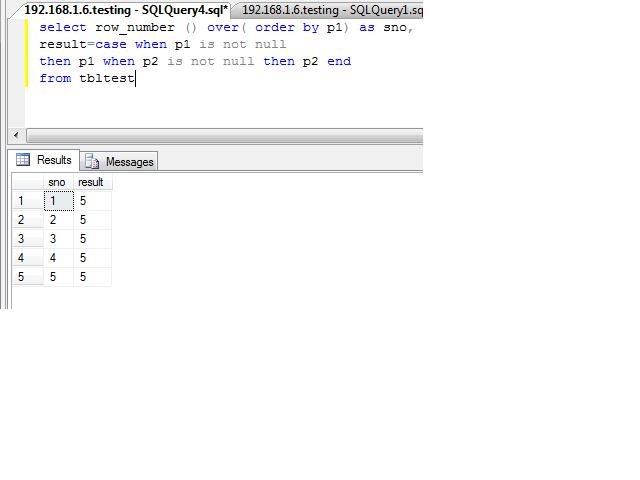
4.Create identity like coulmn in query

select row_number () over( order by p1) as sno, result=case when p1 is not null then p1 when p2 is not null then p2 end from tbltest