Wednesday, November 24, 2010

Accessing Master Page User Control (ascx) event and value in content page.

Sometimes a situation comes wherein you want to do some action on any event fired by master page user control in to a content page.
We can do this by the help of "Delegates".

The situation is I have a user control with a dropdown in header.ascx file, which I have integrated in my masterpage.master.
Now I want to access the event of that dropdownbox (SelectedIndexChanged ) in my content page default2.aspx and the value of the drop down box.

How to do that ?


1. Create a Delegate and event Handler in your usercontrol.ascx.

//Creating delegate for dropdownlist
public delegate void OnSelectedIndex(object sender, EventArgs e);

public event OnSelectedIndex ddl_selectedIndexChanged;

2. Create a Delegate and Eventhandler in your Master page, which we will access in Content Page.
//Creating Delegates and Event handler
public delegate void MasterDropDown(object sender, EventArgs e);
public event MasterDropDown Header_DropDown;


3. Now access the same on content page
For this first call the master page like
<%@ MasterType VirtualPath="~/MasterPage.master"%>
//And then in your content page load method
protected void Page_Load(object sender, EventArgs e)
{
Master.Header_DropDown += new MasterPage.MasterDropDown(Master_Header_DropDown);
}

For Accessing the value

1. Define a property in ascx control

//Geting the Drop Down Value
public string DropDownValue
{
get { return DropDownList1.SelectedValue; }
}
2. Access the value in master page

//Geting the User Control value
public string UserControlValue
{
get { return uc_usercontrol1.DropDownValue; }
}
3. Now access the value in Content page in a lable

Label1.Text =Label1.Text+" "+ Master.UserControlValue;


Complete Code

User Control

uc_usercontrol.ascx
<%@ Control Language="C#" AutoEventWireup="true" CodeFile="uc_usercontrol.ascx.cs"
Inherits="uc_Usercontrols" %>
<asp:DropDownList ID="DropDownList1" runat="server" AutoPostBack="True" 
onselectedindexchanged="DropDownList1_SelectedIndexChanged">
<asp:ListItem>1</asp:ListItem>
<asp:ListItem>2</asp:ListItem>
<asp:ListItem>3</asp:ListItem>
<asp:ListItem>4</asp:ListItem>
<asp:ListItem>5</asp:ListItem>
<asp:ListItem>6</asp:ListItem>
<asp:ListItem></asp:ListItem>
</asp:DropDownList>

uc_usercontrol.ascx.cs using System; using System.Collections.Generic; using System.Web; using System.Web.UI; using System.Web.UI.WebControls; using System.Configuration; using System.Collections.Specialized; public partial class uc_Usercontrols : System.Web.UI.UserControl { //Geting the Drop Down Value public string DropDownValue { get { return DropDownList1.SelectedValue; } }

//Creating delegate for dropdownlist public delegate void OnSelectedIndex(object sender, EventArgs e); public event OnSelectedIndex ddl_selectedIndexChanged; protected void Page_Load(object sender, EventArgs e) { }

protected void DropDownList1_SelectedIndexChanged(object sender, EventArgs e) { this.ddl_selectedIndexChanged(sender, e);

} }

Master Page

MasterPage.master
<%@ Master Language="C#" AutoEventWireup="true" CodeFile="MasterPage.master.cs" Inherits="MasterPage" %>

<%@ Register Src="uc_usercontrol.ascx" TagName="uc_usercontrol" TagPrefix="uc1" %> <!DOCTYPE html PUBLIC "-//W3C//DTD XHTML 1.0 Transitional//EN" "http://www.w3.org/TR/xhtml1/DTD/xhtml1-transitional.dtd"> <html xmlns="http://www.w3.org/1999/xhtml"> <head runat="server"> <title></title> <asp:ContentPlaceHolder ID="head" runat="server"> </asp:ContentPlaceHolder> </head> <body> <form id="form1" runat="server"> <div> <uc1:uc_usercontrol ID="uc_usercontrol1" runat="server" /> <asp:ContentPlaceHolder ID="ContentPlaceHolder1" runat="server"> </asp:ContentPlaceHolder> </div> </form> </body> </html> MasterPage.master.cs

using System; using System.Collections.Generic; using System.Web; using System.Web.UI; using System.Web.UI.WebControls;

public partial class MasterPage : System.Web.UI.MasterPage { //Geting the User Control value public string UserControlValue { get { return uc_usercontrol1.DropDownValue; } } //Creating Delegates and Event handler public delegate void MasterDropDown(object sender, EventArgs e); public event MasterDropDown Header_DropDown; protected void Page_Load(object sender, EventArgs e) { this.uc_usercontrol1.ddl_selectedIndexChanged += new uc_Usercontrols.OnSelectedIndex(uc_usercontrol1_ddl_selectedIndexChanged); }

void uc_usercontrol1_ddl_selectedIndexChanged(object sender, EventArgs e) { this.Header_DropDown(sender, e); } }

Default2.aspx <%@ Page Title="" Language="C#" MasterPageFile="~/MasterPage.master" AutoEventWireup="true" CodeFile="Default2.aspx.cs" Inherits="Default2" %> <%@ MasterType VirtualPath="~/MasterPage.master"%> <asp:Content ID="Content1" ContentPlaceHolderID="head" Runat="Server"> </asp:Content> <asp:Content ID="Content2" ContentPlaceHolderID="ContentPlaceHolder1" Runat="Server"> <asp:Label ID="Label1" runat="server" Text="Hi I m visible now" Visible="false"></asp:Label> </asp:Content>

Default2.aspx.cs

using System; using System.Collections.Generic; using System.Web; using System.Web.UI; using System.Web.UI.WebControls;

public partial class Default2 : System.Web.UI.Page {

protected void Page_Load(object sender, EventArgs e) { Master.Header_DropDown += new MasterPage.MasterDropDown(Master_Header_DropDown); }

void Master_Header_DropDown(object sender, EventArgs e) { //Here you can do any activity on change dropdown list Label1.Visible = true; //Accessing the Master page User Control Value in content Page Label1.Text =Label1.Text+" "+ Master.UserControlValue; } }

Download Code

Friday, November 19, 2010

Dynamic SQL Query

Dynamic Sql query means genrating sql query at run time according to need. Some times a situation comes where we have to genrate the dynamic query. Below is the example of a search condition in stored procedure, where I am genrating dynamic query, according to parameter passed in Stored Procedure.
It has demerits too. It will loose the performance boost, what we usually get in stored procedures and most importantly stored procedure can not cache the execution plan for this dynamic query.


Stored Procedure
CREATE proc usp_Getsearchresult  
@countryid int,  
@cityid int,  
@categoryid int,  
@keywords varchar(255)  
as  
--TO HOLD THE QUERY
Declare @setQuery nvarchar(2200)      
--TO HOLD THE WHERE CONDITION VALUES
declare @whereTosearch nvarchar (2000)      
--TO HOLD THE CONDITION
declare @condition int      
set @setQuery='select * from product with (NOLOCK) where '  
 --Condition for country ID  . WHERE COUNTRY ID IS MANDATORY IN CODE
  if (@countryid is not Null)      
 begin      
   set @condition=1      
   set @whereTosearch='countryId='+cast(@countryid as varchar(5))      
 --print '1'  
 end     
 -- Condition for city   
  if (@cityid is not Null and @condition>0)      
 begin      
   set @condition=1      
   set @whereTosearch=@whereTosearch+' and cityId='+ cast(@cityid as varchar(5))  
 --print '2'  
 end     
 --Condition if catetory is selected  
  if (@categoryid is not Null and @condition>0)      
 begin      
   set @condition=1    
   set @setQuery='select product.*,product_category.product_category_type_id from product with (NOLOCK)  
   left  outer join product_category on  product.service_id=product_category.service_id where product_category.product_category_type_id is not null and '  
   set @whereTosearch=@whereTosearch+' and product_category.product_category_type_id='+cast(@categoryid as varchar(5))  
 --print '3'  
 end     
 -- Condition for Keywords   
  if (@keywords is not Null and @condition>0)      
 begin      
   set @condition=1      
   set @whereTosearch=@whereTosearch+' and (productname like ''%'+@keywords+'%'' or product_keyword like ''%'+@keywords+'%'')'  
 --print '4'  
 end   
  
set @setQuery=@setQuery+@whereTosearch      
--print @setQuery  
exec(@setQuery) 

Wednesday, November 3, 2010

Hiding datagrid column at runtime in asp.net

Sometimes you want to hide the column at runtime in datagrid. Below is the code. You can do this on RowCreated event of datagrid.


protected void gvreport_RowCreated(object sender, GridViewRowEventArgs e)
    {
       

        if (username=="Admin")// Your Condition for hiding the column
        {
            if (e.Row.RowType == DataControlRowType.DataRow)
            {
                e.Row.Cells[4].Visible = false;

            }
            if (e.Row.RowType == DataControlRowType.Header)
            {
                e.Row.Cells[4].Visible = false;
            }
        }
    }

Saturday, October 30, 2010

Friday, October 8, 2010

Some tricky SQL queries (Interview Questions)

1.Select nth highest salary and name from emp table
SELECT DISTINCT (a.empsalary),a.Employee_Name FROM empData A WHERE  N =(SELECT COUNT (DISTINCT (b.empsalary)) FROM empData B WHERE a.empsalary<=b.empsalary);
--where N is your number (2nd or 5th)
e.g SELECT DISTINCT (a.empsalary),a.Employee_Name FROM empData A WHERE  5 =(SELECT COUNT (DISTINCT (b.empsalary)) FROM empData B WHERE a.empsalary<=b.empsalary);

2.Select query without using "Like" operator . For eg select employee name start with 'j' and city is 'Noida' in company_name

select * from empdata where CHARINDEX('j',Employee_name)=1 and CHARINDEX('Noida',company_name)>0


3.Select query for grouping 2 coulmns in one column using Case statement

select result=case when p1 is not null then p1 when p2 is not null then p2 end from tbltest


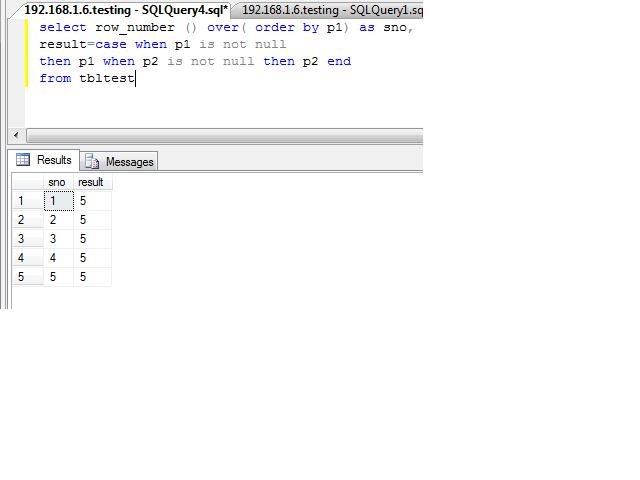
4.Create identity like coulmn in query

select row_number () over( order by p1) as sno, result=case when p1 is not null then p1 when p2 is not null then p2 end from tbltest

Thursday, September 30, 2010

ELMAH: Error Logging Modules and Handlers for ASP.NET

A very good open source project for handling and loging .net errors. It logs nearly all the unhandled errors. You can view full details of your error log using http://www.yoursite.com/elmah.axd . An e-mail notification of each error at the time it occurs. For Download and more information on ELMAH

Download Sample Code

Tuesday, September 28, 2010

A basic example of LINQ

LINQ stands for Language-Integrated Query.It return results of type: IEnumerable<T> where <T> is determined by the object type of the “select” clause.

And asp.net controls support databinding to any IEnumerable collection so we can easily bind the datagrid,reapter,datalist and dropdownlist with Linq query.

default.aspx
<%@ Page Language="C#" AutoEventWireup="true" CodeFile="Default.aspx.cs" Inherits="_Default" %>
<!DOCTYPE html PUBLIC "-//W3C//DTD XHTML 1.0 Transitional//EN" "http://www.w3.org/TR/xhtml1/DTD/xhtml1-transitional.dtd">

<html xmlns="http://www.w3.org/1999/xhtml">

<head runat="server">

<title></title>

</head>

<body>

<form id="form1" runat="server">

<div>

<asp:GridView ID="grdCountryList" runat="server" AutoGenerateColumns="False" BackColor="LightGoldenrodYellow"

BorderColor="Tan" BorderWidth="1px" CellPadding="2" ForeColor="Black"

GridLines="None" AllowPaging="True">

<Columns>

<asp:BoundField DataField="CountryId" HeaderText="CountryId" />

<asp:BoundField DataField="CountryName" HeaderText="Country Name" />

<asp:BoundField DataField="CountryCode" HeaderText="Country Code" />

</Columns>

<FooterStyle BackColor="Tan" />

<PagerStyle BackColor="PaleGoldenrod" ForeColor="DarkSlateBlue" HorizontalAlign="Center" />

<SelectedRowStyle BackColor="DarkSlateBlue" ForeColor="GhostWhite" />

<HeaderStyle BackColor="Tan" Font-Bold="True" />

<AlternatingRowStyle BackColor="PaleGoldenrod" />

</asp:GridView>

<br />

Linq Where country code lenght is less than 3

<br />

<asp:GridView ID="GridView1" runat="server" AutoGenerateColumns="False" BackColor="LightGoldenrodYellow"

BorderColor="Tan" BorderWidth="1px" CellPadding="2" ForeColor="Black" GridLines="None">

<Columns>

<asp:BoundField DataField="CountryId" HeaderText="CountryId" />

<asp:BoundField DataField="CountryName" HeaderText="Country Name" />

<asp:BoundField DataField="CountryCode" HeaderText="Country Code" />

</Columns>

<FooterStyle BackColor="Tan" />

<PagerStyle BackColor="PaleGoldenrod" ForeColor="DarkSlateBlue" HorizontalAlign="Center" />

<SelectedRowStyle BackColor="DarkSlateBlue" ForeColor="GhostWhite" />

<HeaderStyle BackColor="Tan" Font-Bold="True" />

<AlternatingRowStyle BackColor="PaleGoldenrod" />

</asp:GridView>

<br />

Linq Where country id between 31 to 70

<br />

<asp:GridView ID="GridView2" runat="server" AutoGenerateColumns="False" BackColor="LightGoldenrodYellow"

BorderColor="Tan" BorderWidth="1px" CellPadding="2" ForeColor="Black" GridLines="None">

<Columns>

<asp:BoundField DataField="CountryId" HeaderText="CountryId" />

<asp:BoundField DataField="CountryName" HeaderText="Country Name" />

<asp:BoundField DataField="CountryCode" HeaderText="Country Code" />

</Columns>

<FooterStyle BackColor="Tan" />

<PagerStyle BackColor="PaleGoldenrod" ForeColor="DarkSlateBlue" HorizontalAlign="Center" />

<SelectedRowStyle BackColor="DarkSlateBlue" ForeColor="GhostWhite" />

<HeaderStyle BackColor="Tan" Font-Bold="True" />

<AlternatingRowStyle BackColor="PaleGoldenrod" />

</asp:GridView>

<br />

Linq Where country started from "A"

<br />

<asp:GridView ID="GridView3" runat="server" AutoGenerateColumns="False" BackColor="LightGoldenrodYellow"

BorderColor="Tan" BorderWidth="1px" CellPadding="2" ForeColor="Black" GridLines="None">

<Columns>

<asp:BoundField DataField="CountryId" HeaderText="CountryId" />

<asp:BoundField DataField="CountryName" HeaderText="Country Name" />

<asp:BoundField DataField="CountryCode" HeaderText="Country Code" />

</Columns>

<FooterStyle BackColor="Tan" />

<PagerStyle BackColor="PaleGoldenrod" ForeColor="DarkSlateBlue" HorizontalAlign="Center" />

<SelectedRowStyle BackColor="DarkSlateBlue" ForeColor="GhostWhite" />

<HeaderStyle BackColor="Tan" Font-Bold="True" />

<AlternatingRowStyle BackColor="PaleGoldenrod" />

</asp:GridView>

<br />

Linq Where country with like query

<br />

<asp:GridView ID="GridView4" runat="server" AutoGenerateColumns="False" BackColor="LightGoldenrodYellow"

BorderColor="Tan" BorderWidth="1px" CellPadding="2" ForeColor="Black" GridLines="None">

<Columns>

<asp:BoundField DataField="CountryId" HeaderText="CountryId" />

<asp:BoundField DataField="CountryName" HeaderText="Country Name" />

<asp:BoundField DataField="CountryCode" HeaderText="Country Code" />

</Columns>

<FooterStyle BackColor="Tan" />

<PagerStyle BackColor="PaleGoldenrod" ForeColor="DarkSlateBlue" HorizontalAlign="Center" />

<SelectedRowStyle BackColor="DarkSlateBlue" ForeColor="GhostWhite" />

<HeaderStyle BackColor="Tan" Font-Bold="True" />

<AlternatingRowStyle BackColor="PaleGoldenrod" />

</asp:GridView>

</div>

</form>

</body>

</html> 
default.aspx.cs
using System;using System.Collections.Generic;

using System.Linq;

using System.Web;

using System.Web.UI;

using System.Web.UI.WebControls;

public partial class _Default : System.Web.UI.Page

{

protected void Page_Load(object sender, EventArgs e)

{

if (!IsPostBack)

{

BindGrid();

}

}

#region BIND GRID

private void BindGrid()

{

List<CountryEntity> countryList = new List<CountryEntity>();

CountryPersistence objCountry = new CountryPersistence();

countryList = objCountry.GetCountryList();

//Simple binding of grid using LIST 

grdCountryList.DataSource = countryList;

grdCountryList.DataBind();

 //Now we will start Linq. It will fetch all the data where country code length is less than 3

GridView1.DataSource = from country in countryList where country.CountryCode.Length < 3 orderby country.CountryName select country;

GridView1.DataBind();

 //Where country ID between 31 to 70

GridView2.DataSource = from country in countryList where (country.CountryId >= 31 && country.CountryId <= 70) orderby country.CountryId select country;

GridView2.DataBind();

//Where country name Starts with "A"

GridView3.DataSource = from country in countryList where country.CountryName.StartsWith("A") select country;

GridView3.DataBind();

 //Where country name with like query

GridView4.DataSource = from country in countryList where country.CountryName.Contains('z') orderby country.CountryName descending select country;

GridView4.DataBind();

}

#endregion

} 

Download Code